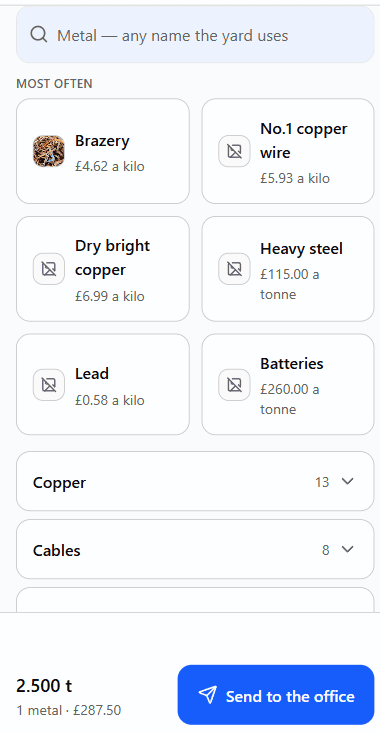
What changes at the gate
It has to be faster than the pad.
If it is slower than writing it down, your lad stops using it within the week and you have paid for nothing.
- The load gets written on a pad and copied up later
- It is written once, at the scale, and it is already in the office by the time the seller has driven out.
- Working the money out at the scale
- The sum is done on the screen while the seller is stood there, and it prints on the slip. A knock-down shows the sum, so the seller can see how it was worked out.
- Arguing about the tub
- The tub goes on empty while the seller watches, every time. There is no saved tub weight anywhere in the app to argue about, and a tub that weighs as much as the metal is refused.
- No signal at the back of the yard
- The load is taken anyway and goes up by itself when the signal returns. A retry can never make the same load twice, and the screen says where the load actually is.
- Your line is down, or ours is
- The gate carries on taking metal. Loads and first-time sellers are held on the tablet, survive it being shut or restarted, and go up on their own — and the same load can never go up twice. The tablet has to have opened ScrapLog once before, with signal, and a photograph needs signal at the time it is taken. The office is a different matter: pricing and paying need the line up.
- The seller leaves with nothing to show
- A slip with a code and the weights on it. It says plainly that it is not a payment, because the office has not priced the load yet.
- “Did my load go through?”
- Answered on the same screen your lad is already looking at, without ringing the office. Each load says where it has got to: waiting to be completed, completed, or paid.
What makes the ticket quick
One screen. No menu, nothing to browse, nothing to get lost in — everything else opens as a sheet and closes again. The buttons are sized for a hand in a glove.
Signing in is tapping your name and typing a PIN. No email address and no password on a wet tablet.
The metal search answers to your yard’s own words for a metal, not ours, so nobody has to translate anything at the scale.
What the gate is not allowed to do
It cannot read a seller’s address, open an ID document, or set a price. The buttons are not simply hidden — the system refuses, so it holds even if somebody goes looking. Prices only reach the gate at all if you switch them on.
Photographs have their location data stripped out before anything is uploaded. The screen says photograph the metal, not people.